AD-HOC ANALYSIS

In this section we will illustrate a number of typical analyses that can be performed with the OSCAR-5 system. Here we can consider calculations such as
snap-shot neutronics (critical_case application) - calculate neutron distribution throughout the core
snap-shot Thermal-hydraulic analysis (core_thermal_hydraulics application) - calculate temperature distribution throughout the core
coupled neutronic-thermal-hydraulics analysis (coupling application) - converges multi-physics analysis between different neutronic and thermal-hydraulics codes)
system code integration and model preparation - prepares input for a system code by generation the core representation
equilibrium calculations (equilibrium application) - conduct multi-cycle analysis to evaluate the future impact on fuel burnup of design changes
uncertainty propagation (sampler application) - determine the impact of a set of input uncertainties on an output quantity of interest
Note
OSCAR-5 is highly customizable. The examples below present the typical approach to such analysis, but in the case of your specific model, some more advanced customization could be present, which might alter where some of the input cards are specified. Nevertheless, the foundational approach presented here is still relevant to most models. Discuss this with your model custodian if uncertain.
Application: Snap-shot neutronics
Hint
This input example can be found under the projects/demo_critical_case.py input file in the SAFARI-1 benchmark
The critical_case application in OSCAR-5 performs a snap-shot neutronics calculation. The application requires some basic input:
the
core configurationto use, which defines themodel,inventoryandfacility_loadingdatabases to use for the calculation (these items can be changed in the critical case input itself also).the date and time of the calculation, so that the core loading (from
facility_loadingdatabase) and core isotopics (from inventory) can be fetchedthe control bank position or state desired for the calculation
the core state in terms of power level and nominal temperatures and densities
any additional core loadings in terms of rigs or irradiation targets.
In order to execute such a calculation, the following commands can be used:
oscar5 MY_REACTOR.projects.critical_case_input --target-mode MGRAC execute
oscar5 MY_REACTOR.projects.critical_case_input --target-mode MGRAC post
oscar5 MY_REACTOR.projects.critical_case_input --target-mode MGRAC post --show
The execute command runs the analysis (you can choose any relevant neutronic code such as MGRAC, Serpent or MCNP). The post mode processes the
output files from the run and packs the data back into the OSCAR-5 results files (.res files).
Finally, the --show option opens a small GUI to allow browsing of the obtained flux profiles.
Hint
Recall the manager utility which processes OSCAR-5 outputs into an HDF5 database for viewing with an HDF5 browser. This manager will also process these output
files for display of detailed results.
Application: Snap-shot thermal-hydraulics
Hint
This input example can be found under the projects/demo_core_thermal_hydraulics.py input file in the SAFARI-1 benchmark
The core_thermal_hydraulics application in OSCAR-5 performs a snap-shot thermal-hydraulics calculation. The application requires some basic input:
defined thermal-hydraulic model specifications per assembly type (typically in the
modelfolder in a file calledthermal_hydraulic_assembly_data)defined flow, pressure and inlet conditions
the
core configurationto use, which defines themodel,inventoryandfacility_loadingdatabases to use for the calculation (these items can be changed in the critical case input itself also).the date and time of the calculation, so that the core loading (from
facility_loadingdatabase) and core isotopics (frominventory) can be fetcheda set of thermal-hydraulic calculational options such as heat convection correlations to use
a pointer to relevant neutronic power data results to use a driver for the thermal-hydraulic calculation (such as from the snap-shot neutronics calculation in the previous section)
a selection of the assemblies for which a calculation is required, ranging from individual assemblies, groups of assemblies or the full core
In order execute such a calculation (PLTEMP code as example), the following command can be used:
oscar5 MY_REACTOR.projects.core_thermal_hydraulics_input --target-mode PLTEMP execute
oscar5 MY_REACTOR.projects.core_thermal_hydraulics_input --target-mode PLTEMP post
The execute command runs the analysis (you can choose any relevant in-core thermal-hydraulics code such as PLTEMP or CTF). The post mode processes the
output files from the run and packs the data back into the OSCAR-5 results files (.res files).
Hint
Recall the manager utility which processes OSCAR-5 outputs into an HDF5 database for viewing with an HDF5 browser. This manager will also process these output files for display of detailed results.
Application: Coupled calculation
Hint
This input example can be found under the projects/demo_coupling.py input file in the SAFARI-1 benchmark
The coupling application in OSCAR-5 performs a coupled neutronics / thermal-hydraulics calculation.
In this application a selected neutronic and thermal-hydraulic code runs iteratively until the system converges.
The application requires some basic input:
input relevant to a snapshot neutronics calculation
input relevant to a snapshot thermal-hydraulic calculation
definition of scope of data exchange from neutronics to thermal-hydraulics, and vice-versa
selection of codes used to perform the coupled calculation
relevant iteration parameters
In order execute such a calculation, the following command can be used:
oscar5 MY_REACTOR.projects.coupled_input execute
oscar5 MY_REACTOR.projects.coupled_input post
Note
You will note that there is no --target-mode specification, since the specific codes to be used for neutronics and thermal-hydraulics
calculation are directly specified in the input file.
The execute command runs the analysis. The post mode processes the
output files and extracts the defined set of critical output parameters as a function of iteration counter. Note that all
.res files from the individual neutronic and thermal-hydraulic iterations are available after the calculation.
Hint
Recall the manager utility which processes OSCAR-5 outputs into an HDF5 database for viewing with an HDF5 browser. This manager will also process these output
files for display of detailed results.
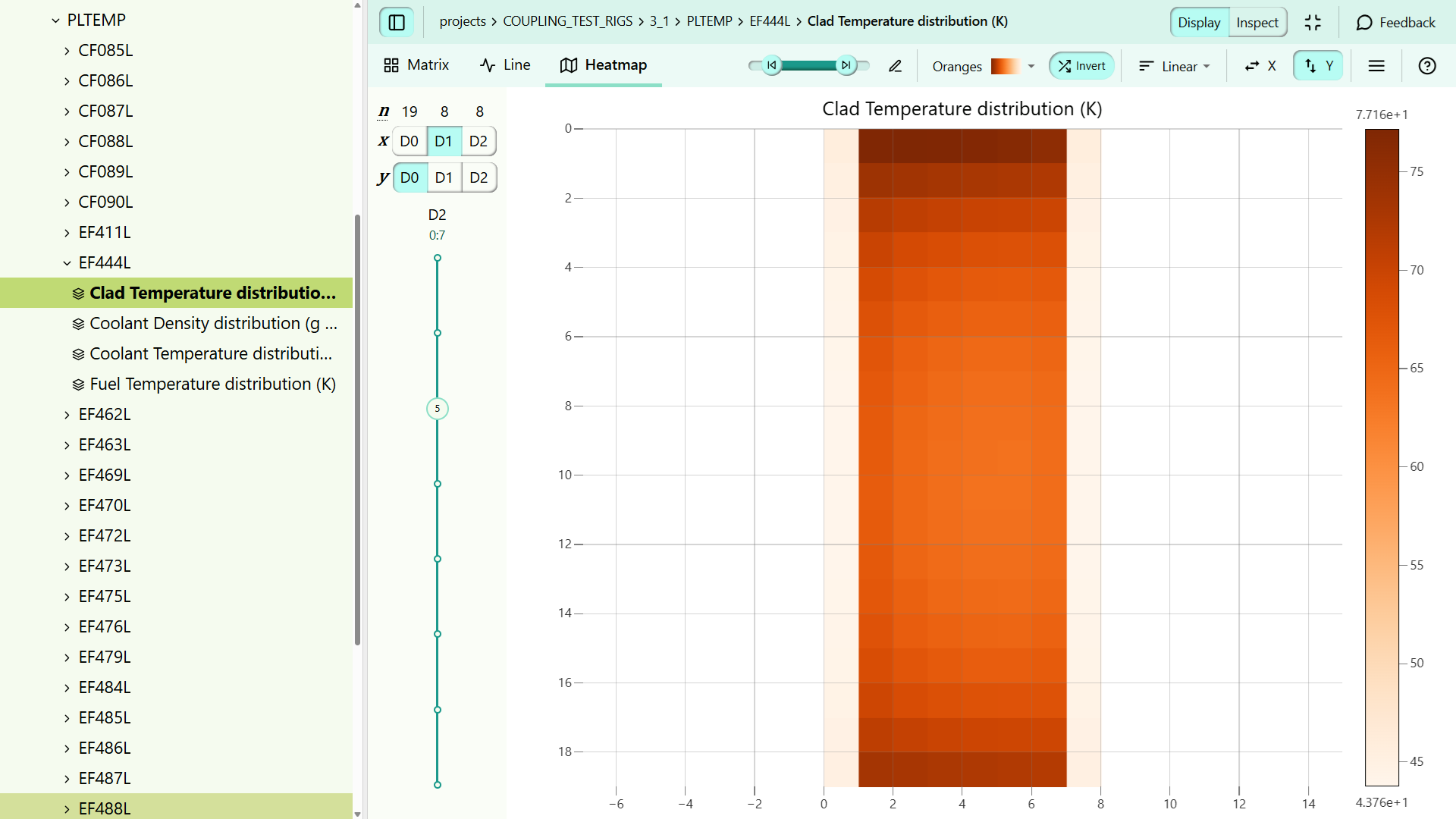
The image illustrates an axial cut of clad temperature through a SAFARI-1 fuel assembly over all 19 plates. This view is generated from the hdf5 results file in OSCAR-5 from a converged neutronic / thermal-hydraulic calculation using MGRAC and PLTEMP.
Application: System code model generation
Hint
This input example can be found under the projects/demo_system_core_model.py input file in the SAFARI-1 benchmark
The OSCAR-5 system code model generation application, termed system_core_thermal_hydraulics, functions as an extension to the core_thermal_hydraulics application you were introduced to in the
previous section. System models are typically used for transient analyses, but can also provide steady state solutions. In this case, the aim is to generate the core representation of the reactor for the sake of a system code input model.
This differs from typical in-core detailed sub-channel thermal-hydraulics in the sense that effective heat structures and hydro-dynamic channels are defined in terms of groups of assemblies,
plates or sections of plates.
In this OSCAR-5 application, the user can provide a set of high-level channel definitions, where-after OSCAR-5 will search through available neutronics and thermal-hydraulics results for the core under consideration in order to generate the required channel representation dynamically.
For this application, the user is expected to already have a system model in place, with OSCAR-5 only used to generate the representation of the reactor core in terms of radial and axial flow channels and heat structures. Interface identifiers for the core model must be supplied so that OSCAR-5 can correctly integrate the core representation with the rest of the model.
The application requires some basic input:
A proposed set of core hydro-dynamic channels and associate heat structures to define the core representation.
A mapping of core element identifiers from the external system model in order to correctly connect the generated model to the existing system model.
snapshot steady-state neutronics calculational results needed to characterise the core power distribution
snapshot steady-state thermal-hydraulic calculational results needed to characterise the core temperature distribution
a heat deposition description to guide the system to appropriately allocate heat to active and passive regions from both fission and gamma heat.
Note
Note that this application might require some customization of the user’s external system model before integration into the OSCAR-5 system would be possible. This would imply a process of translating the external model into a so-called OSCAR-5 template, in order to make sure generated input cards correctly communicates to other parts of the model. This is often difficult to fully automate, as system code users apply very different philosophies in generating system models. This is best done in collaboration with the developers, but can be performed by an advanced user.
In order to execute such a calculation, the following command can be used (RELAP as example):
oscar5 MY_REACTOR.projects.system_core_thermal_hydraulic_input --target-mode RELAP execute
oscar5 MY_REACTOR.projects.system_core_thermal_hydraulic_input --target-mode RELAP post
The execute command generates the core model and runs the analysis. The post mode processes the output and extracts identified quantities of interest.
A typical set of core model elements, which can be customized by the user, could contain:
a bulk channel representing the general core behaviour
a hot assembly channel
a hot plate channel, potentially modelled with its direct neighbours
a hot-spot element, to allow the generation of the maximum local conditions.
Hint
In identification of hot channels, the user has the option to request identification of channel constituents via power or temperature characteristics.
With the above as example, the system would then search all available neutronic and thermal-hydraulic results and correctly identify the above channels, constructing a channel model faithfully reflecting the conditions of the driving core.
OSCAR-5 would compute typical quantities needed by a system code in the process of generating the model, such as:
axial power distribution, on a user selected mesh, for each defined core heat structure
heat transfer areas, heating volumes, flow areas and flow volumes for each hydro-dynamic volume
estimated flows through core heat structures, hydro-dynamic volumes and junctions.
a set of control cards to allow important time-dependent variables and quantities to be computed on the fly during transient analyses.
As an example, see below an example of typical power distributions, channel allocations and heat deposition options as example of the kind of power output generated.
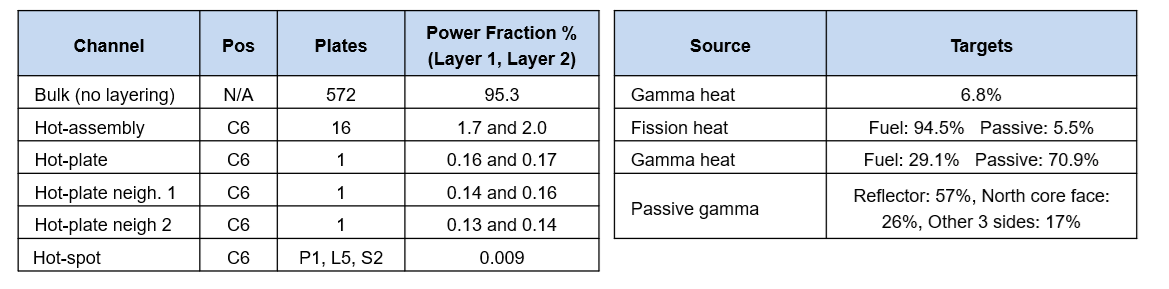
The output produced here is for a two-layer axial power distribution making use of the radial channel structure given above.
Application: Equilibrium calculation
Hint
This input example can be found under the equilibrium/demo_equilibrium.py input file in the SAFARI-1 benchmark
The equilibrium application in OSCAR-5 performs a so-called equilibrium core calculation, using the neutronic code selected by the user. This type of application
typically allows for a predictive multi-cycle analysis in order to determine the impact of a given core design, or loading strategy change on fuel isotopics in the long term.
The foundation of the approach is found in the principle that applying a given loading pattern repetitively for a given core design will eventually lead to an equilibrium cycle, which exhibits the same
cycle characteristics (reactivity, masses, fluxes) in every subsequent cycle. This occurs since fresh assemblies will eventually all experience the same irradiation conditions, once all older assemblies
which still retain some memory of their own initial condition has been unloaded from the core.
The application requires some basic input:
typical input relevant to a snap-shot neutronic analysis
a defined cycle progression in terms of power levels and control rod positions as a function of time
a definition of fresh assemblies which should be added in each cycle
a cycle reload philosophy, which determines where fresh elements are loaded, where other assemblies are shuffled to, and which assemlbies are unloaded
total number of cycles to model - typically this be a sufficient number to allow the core to be fully reloaded at least twice
In order execute such a calculation, the following command can be used:
oscar5 MY_REACTOR.projects.equilibrium_input --target-mode CODE execute
The execute command runs the series of cycles up to the predetermined total number. The final cycle, and preceding one can then be inspected
to confirm whether or not equilibrium was sufficiently reached (visualisation for the multi-cycle progression can be inspected via the hdf5 viewer)
Application: Uncertainty Propagation
Hint
This input example can be found under the projects/demo_clad_temperature_uncertainty.py input file in the SAFARI-1 benchmark
Although sampler is viewed as an application in OSCAR-5, it only makes sense in combination with another application. ‘Sampler’ is a generic
interface for propagating uncertainties through another application by sampling from a defined space of uncertain inputs. It requires basic
input for the application it is wrapped around, as well as additional input specific to the sampler application. The sub-application
specific input is covered in other parts of this guide, while the input to sampler includes:
the application to which uncertainty propagation will be applied, e.g. ‘critical_case’
a definition of which inputs to perturb for each iteration/sample, and how to sample from their distributions
a way to collect and store (accumulate) results from each application run
relevant iteration parameters for the iterations over the uncertain input space
In order execute such a calculation, the following command can be used:
oscar5 MY_REACTOR.projects.sampler_input --target-mode CODE execute
The execute command runs the chosen application a pre-determined number of times, varying the selected uncertain
quantities by sampling from their constrained joint probability distribution for each iteration. By default
each sample is overwritten by the subsequent one and only the final sample is kept at the end of the run. This can be
overwritten by the --unique-project command line option. Similarly, the number of samples to run can be set in the
input, or passed on the command line using the --number-of-samples option.
The second and third points above bear some extra discussion. The definition of which parameters to sample,
and how to perturb them, is called the generator, and is usually quite problem specific and dependent on the capabilities
of the target code. After importing the sampler application, the distribution is defined, along with a confidence interval:
# Sample from a multi-variate normal distribution
sampler = sampler_app.RandomVariables(num_sigmas=5)
The uncertain inputs are then defined, along with their intervals and any constraints:
# ----------------------------------------------------------------------------------------------------------------------
# Water gaps
# ----------------------------------------------------------------------------------------------------------------------
# Nominal values and intervals
min_water_gap = 2.7 * units.mm
max_water_gap = 3.2 * units.mm
nominal_water_gap = 2.95 * units.mm
# Register variable
gap = sampler.add_variable(nominal_water_gap, 'water_gap', uncertainty=0.095)
# Add constraints
sampler.add_constraint(gap > sampler_app.Constant(min_water_gap))
sampler.add_constraint(gap < sampler_app.Constant(max_water_gap))
A custom accumulator uses the built-in accumulator from ‘core.statistics’ to gather and store specific (defined) results from each run of the sub-application
res = app.get_results()
if res is None:
    return
# extract the maximum clad temperature
cld, pos = res.max_temperature[material_tags.clad]
self.acc(cld.to(units.degC).magnitude)
For the example used here, the results after 30 iterations are
Max clad temp 87.96 degC at C6 layer 5
89.01 +- 1.36
Three sigma (99.9 percent) confidence interval on max clad temperature: (84.017, 93.995)
Five sigma confidence interval on max clad temperature:                 (80.316, 97.697)
Uncertainty (5 sigma): 0.10
Delta (5 sigma): 8.67 degC