Pin Type Fuel Assemblies
Collects all macros used to construct pin type fuel assemblies, as used in LWR (PWR, and BWR) reactor designs.
Unlike the typical MTR macros, which creates all fueled components during construction, pin type assemblies are constructed in two phases:
First define all pins (fuel pins, guide tubes, etc), usually in separate build scripts.
Then provide the pin layout in another build script defining the actual assembly.
This strategy was adapted to avoid having an extremely large number of very similar cells in the assembly.
Pins
Attention
Although pins are constructed separately, their activation during irradiation calculations are still controlled by the parent assembly. This is why burnable materials are not assigned directly to the pins, but rather bundle_tag instances.
Pin type assemblies are constructed by axially stacking two dimensional (radial) cell definitions. The latter is
constructed by the PinCell macro, while the former is accomplished using a PinCellStack. Both
are available form the core.fuel_assembly module.
Defining radial structure
Radial pin layers are constructed using the PinCell structure. A detailed description of its general
use can be found here. The core.fuel_assembly also provides the following convenience function
to create a typical fuel pin radial layout:
- fuel_assembly.fuel_pin(diameter, gap, clad, bundle=assembly.fuel_bundle(), gas=Helium(), cladding=Zircaloy4(), fill=BoratedWater())
Create the radial structure of a typical fuel pin, consisting of a meat region, a gap and cladding.
- Parameters:
diameter (length) – The diameter of the active region.
gap (length) – The gap size.
clad (length) – The cladding thickness.
bundle (bundle_tag) – Contents of the active region.
gas (material) – Material filling the gap between fuel and cladding.
cladding (material) – Cladding material.
fill (material) – Material surrounding the pin.
- Returns:
A PinCell.
Note
This macro is not general enough to treat more sophisticated cases, e.g integrated burnable absorber layers, or inclusion of crate like structures. In these cases the PinCell construction should be used instead.
Defining axial structure
Different radial layers are stacked to form a complete pin using a PinCellStack. It is contained in the
core.fuel_assembly module and is used in your build module as follows:
from core import *

def build(*args, **kwargs):

    asm = fuel_assembly.PinCellStack(name='MY_REACTOR_some_awesome_pin')
Apart from all the standard assembly parameters, it also defines the following:
-
pin_cell_stack.top_fill_material
: material
= `DryAir` The material that will be used to fill the space above the last layer added.
-
pin_cell_stack.bottom_fill_material
: material
= `DryAir` The material that will be used to fill the space below the last layer added.
- pin_cell_stack.pitch
This parameter defines the lattice (cookie cutter) cell which this pin will fill. It is either
Note
This parameter is optional, and will only be used to clip unbounded radial regions for visualization purposes.
The actual pin is constructed by adding consecutive layers using the following method:
- pin_cell_stack.add_layer(lower_bound, upper_bound, data)
Adds a new radial layer.
- Parameters:
Attention
Currently, the layers must be added in an increasing fashion from bottom to top.
Finally, the pin structure is created using the pin_cell_stack.build method:
- pin_cell_stack.build()
Creates all the radial cells, and stacks them axially. Returns the resulting Assembly.
Example:
>>> from core import *
>>> from core.fuel_assembly import PinCell, PinCellStack, Helium, ZircAlloy4
>>> fuel = PinCell() | (0.39218 * units.cm, bundle_tags.fuel) | (0.40005 * units.cm, Helium()) | (0.45720 * units.cm, Zircalloy4())
>>> solid = PinCell() | (0.45720 * units.cm, Zircalloy4())
>>> stack = PinCellStack(name='REACTOR-fuel-pin')
>>> stack.add_layer(20.0000 * units.cm, 35.1600 * units.cm, solid)
>>> stack.add_layer(35.1600 * units.cm, 300 * units.cm, fuel)
>>> stack.add_layer(300 * units.cm, 315.16 * units.cm, solid)
>>> stack.pitch = 2.0 * 0.62992 * units.cm
>>> pin = stack.build()
>>> pin.show()
Pins with different burnable materials
Many pin type assemblies contain pins with different fuel material compositions. To accommodate this, additional bundle_tag should be used. New tags of the same type are created by passing an index. For example,
>>> from core import *
>>> from core.fuel_assembly import PinCell, PinCellStack, Helium, ZircAlloy4
>>> std = PinCell() | (0.39218 * units.cm, bundle_tags.fuel) | (0.40005 * units.cm, Helium()) | (0.45720 * units.cm, Zircalloy4())
>>> rpr = PinCell() | (0.39218 * units.cm, bundle_tags.fuel(1)) | (0.40005 * units.cm, Helium()) | (0.45720 * units.cm, Zircalloy4())
will assign the fuel tag with index 0 (the default) to the first pin, and the fuel tag with index 1 to the second pin. These now represent two different burnable structures, which are managed independently. In particular, initial material distributions must be assigned for each one. See and Depletion meshes for pin type assemblies for more information.
Axially heterogeneous materials
Although axially heterogeneous fuel materials (e.g. breeder zones) can also be treated using the above bundle_tag mechanism (tags are assigned per radial region after all), this can become cumbersome. It is recommended to used and explicit initial (axial) material mesh instead. See Depletion meshes for pin type assemblies for an example.
Guide tubes
Guide tubes, used for control structures, irradiation targets or instruments, are added just like normal fuel pins (that is, by stacking different radial zones). Instead of assigning a bundle_tag to the interior region, a facility name is assigned. For example,
>>> from core import *
>>> from core.fuel_assembly import PinCell, ZircAlloy4
>>> gt = PinCell() | (0.56134 * units.cm, 'guide-tube') | (0.60198 * units.cm, ZircAlloy4())
This facility name is then used later to load targets, like control control fingers or absorbers.
Removable absorbers
Non integrated absorbers, that is, absorbers which can be added and removed from the assembly, typically in guide tubes, are modelled using a separate component. It can be constructed as a pin, or any other assembly.
Attention
Only the actual absorber structure should be modelled, and not the entire guide tube with the absorber. This is because the absorber will be loaded to the appropriately marked facility in the guide tube.
Absorbers are loaded using the pin_assembly.load_burnable_absorbers() method, or during core configuration.
Note
If removable absorber activation should be tracked, the absorber rods should be made burnable and added to the inventory before loading into the assembly.
Control fingers
The control rods entering intra assembly guides are modelled as separate control assemblies. The one difference is that a single instance can be used, as it would be automatically duplicated to produce all the fingers.
Pin Bundles
These are the assembly types that collects the pins in a particular layout, and adds some additional structure. They
are contained in the fuel_bundle module.
Although the assembly types differ in pin layout and assembly shape, they all allow for the inclusion of cavities in the pin lattice. A cavity is any structure which breaks the regular lattice, and is typically used for additional control mechanisms like rods or burnable absorbers. They are added using the following call:
- pin_assembly.add_cavity(region)
Register a the boundary of a hole in the pin lattice.
- Parameters:
region (region) – The boundary of the hole.
The pins specified in the
pin_assembly.pin_layoutfill the bounding region outside these cavities.Attention
Only the boundary of the cavity should be specified here. All cells filling the cavity are specified using the normal cell addition methods.
As with other assembly macros, after all parameters are specified, cells are constructed by calling construct_bundle().
Square and rectangular pin bundles
Assemblies with pins arranged in a rectangular mesh. There are two types in core.fuel_assembly:
SquarePinBundle(orRectangularPinBundle), which defines only the cells containing the pin lattice.
SquarePinAssembly(orRectangularPinAssembly), which also defines additional sleeve or spacer cells outside the pin lattice.
Since both are Assemblies, all the standard assembly parameters are available. In
addition, the following parameters are exposed:
-
pin_assembly.size
: tuple
! The number of rows and columns of the pin lattice (grid). For example,
asm.size = 17, 18means there are 17 rows (stacked along the \(y\)-axis) and 18 columns in the pin lattice.
- pin_assembly.pin_cell_pitch !
The pitch, or distance between neighboring pins in the lattice. Either a single length value if the lattice is square, or a two length values if the lattice is rectangular. In the latter case the \(x\) distance (neighboring columns) is given first, and the \(y\) distance (between neighboring rows) is the second value.
Note
Only fixed pitch, regular lattices are allowed.
- pin_assembly.filler
The material or component that should be used in the empty positions (denoted by the placeholder
_) in the layout grid. This parameter is only required if there are empty positions in the grid, which typically arise if cavities (as specified usingpin_assembly.add_cavity()) are present.
-
pin_assembly.pin_layout
: grid
! The layout of pins in the rectangular lattice. This is specified as a two dimensional grid of size equal to
pin_assembly.size, containing pin or empty placeholder tags.from core import * from . import assemblies fp = assemblies.MY_REACTOR_fuel_pin() gt = assemblies.MY_REACTOR_guide_pin() fa.pin_layout = \ [[fp, fp, fp, fp, fp, fp, fp, fp, fp, fp, fp, fp, fp, fp, fp, fp, fp], [fp, fp, fp, fp, fp, fp, fp, fp, fp, fp, fp, fp, fp, fp, fp, fp, fp], [fp, fp, fp, fp, fp, gt, fp, fp, gt, fp, fp, gt, fp, fp, fp, fp, fp], [fp, fp, fp, gt, fp, fp, fp, fp, fp, fp, fp, fp, fp, gt, fp, fp, fp], [fp, fp, fp, fp, fp, fp, fp, fp, fp, fp, fp, fp, fp, fp, fp, fp, fp], [fp, fp, gt, fp, fp, gt, fp, fp, gt, fp, fp, gt, fp, fp, gt, fp, fp], [fp, fp, fp, fp, fp, fp, fp, fp, fp, fp, fp, fp, fp, fp, fp, fp, fp], [fp, fp, fp, fp, fp, fp, fp, fp, fp, fp, fp, fp, fp, fp, fp, fp, fp], [fp, fp, gt, fp, fp, gt, fp, fp, gt, fp, fp, gt, fp, fp, gt, fp, fp], [fp, fp, fp, fp, fp, fp, fp, fp, fp, fp, fp, fp, fp, fp, fp, fp, fp], [fp, fp, fp, fp, fp, fp, fp, fp, fp, fp, fp, fp, fp, fp, fp, fp, fp], [fp, fp, gt, fp, fp, gt, fp, fp, gt, fp, fp, gt, fp, fp, gt, fp, fp], [fp, fp, fp, fp, fp, fp, fp, fp, fp, fp, fp, fp, fp, fp, fp, fp, fp], [fp, fp, fp, gt, fp, fp, fp, fp, fp, fp, fp, fp, fp, gt, fp, fp, fp], [fp, fp, fp, fp, fp, gt, fp, fp, gt, fp, fp, gt, fp, fp, fp, fp, fp], [fp, fp, fp, fp, fp, fp, fp, fp, fp, fp, fp, fp, fp, fp, fp, fp, fp], [fp, fp, fp, fp, fp, fp, fp, fp, fp, fp, fp, fp, fp, fp, fp, fp, fp] ]
Only the symmetric portion of the pin layout may be specified. For example, the above can be simplified by only specifying the upper left corner (1/4 of assembly), and then unfolding:
fa.pin_layout = \
    [[fp, fp, fp, fp, fp, fp, fp, fp, fa],
     [fp, fp, fp, fp, fp, fp, fp, fp, fp],
     [fp, fp, fp, fp, fp, gt, fp, fp, gt],
     [fp, fp, fp, gt, fp, fp, fp, fp, fp],
     [fp, fp, fp, fp, fp, fp, fp, fp, fp],
     [fp, fp, gt, fp, fp, gt, fp, fp, gt],
     [fp, fp, fp, fp, fp, fp, fp, fp, fp],
     [fp, fp, fp, fp, fp, fp, fp, fp, fp],
     [fp, fp, gt, fp, fp, gt, fp, fp, ip]]

fa.pin_layout = fa.pin_layout.unfold('r', 'b')
Attention
All rows and column entries must be specified. If there are cavities (added using
pin_assembly.add_cavity()) in the lattice, use the empty placeholder_in the positions that will be clipped.
-
pin_assembly.axial_region
: region
Specify the axial bound of the region containing the pin cell lattice. The radial bound is deduced automatically from
pin_assembly.sizeandpin_assembly.pin_cell_pitch.If not specified, the assembly will not be bounded axially (which is usually not a problem).
-
pin_assembly.background_material
: material
The material that should be used to fill the region outside the pin lattice.
Note
Do not specify this parameter if you plan to add custom cells (e.g an assembly box) outside the pin lattice!
Attention
If this parameter is not specified, no cells will be added around the lattice. Thus, in order complete the assembly construction, these cells must be added automatically, or one of the mesh completion mechanisms must be used.
The SquarePinAssembly (or RectangularPinAssembly) extends the basic SquarePinBundle by adding
spacer regions outside the pin lattice. In order to accommodate this, the following additional parameters are required:
- pin_assembly.spacer_pitch
This is the total pitch of assembly including the sleeve region. It must be larger that the size of the pin lattice, but less than or equal to the actual core pitch (distance between neighboring assemblies in the reactor core).
Either a single length value if the pitch is square, or a tuple of two length values for a rectangular pitch.
Note
This parameter is optional, and if it is not specified, the assembly will be equivalent to a
SquarePinBundle.
-
pin_assembly.sleeve_material
: material
Material that fills the axial gap between spacer sleeve layers. Will be initiated to
pin_assembly.background_materialif this parameter was set.
The spacer sleeves (which usually coincides with crate structures within the pin lattice) are from bottom to top using the following:
- pin_assembly.add_spacer(lower, upper, material)
- Parameters:
lower (length) – The lower axial bound of the sleeve region.
upper – The upper axial bound of the sleeve region.
material – The material which should fill the sleeve region between lower and upper.
The spacers must be added in strictly increasing order. The regions between the spacers are filled with
pin_assembly.sleeve_material.
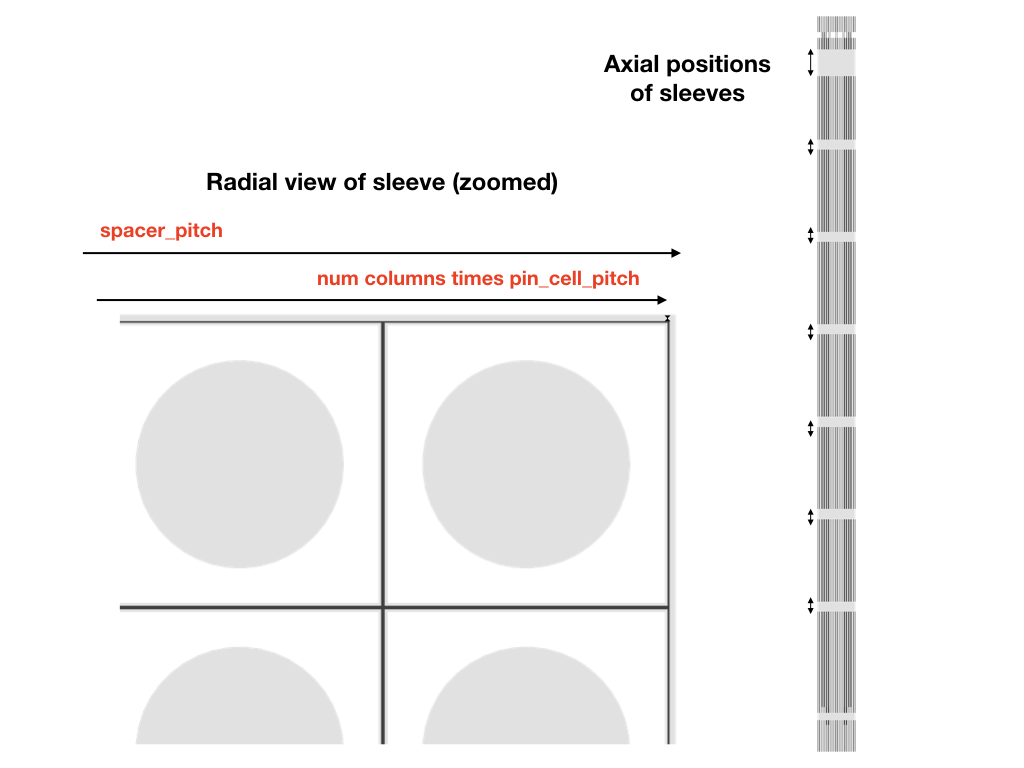
Schematic showing were the sleeve spacers are present in the final assembly.
Hexagonal pin bundles
Under construction!
Loading burnable absorbers
All pin bundle type assemblies also allow burnable absorbers to be loaded using the following method:
- pin_assembly.load_burnable_absorbers(layout, facility_name=None)
Loads absorbers into specified positions.
- Parameters:
layout (grid [component]) – A grid giving the absorber instances to load. The grid should have the same dimensions as the assembly
pin_assembly.size. Use empty placeholder tokens_to denote positions that can not be loaded or should be skipped. Efacility_name (str) – The facility to target. If not specified, the first facility added to a pin will be assumed.
Removable absorber patterns can also be specified and loaded during core configuration,
using the model.removable_absorber_load_map parameter.
Note
By its very definition, removable absorber loading is usually not defined in the assembly build script.
Depletion meshes for pin type assemblies
The principal fuel (or burnable) primitive in these assemblies are Pins, and bundles represent groups of pins. Pins are bundled by assigning them an index in the pin grid. For example, if the assembly has a \(5\times 5\) pin grid, then:
asm.burn_bundles[bundle_tags.fuel].depletion_mesh.bundle =\
 [[0, 0, 0, 0, 0],
  [0, 1, 1, 1, 0],
  [0, 1, 1, 1, 0],
  [0, 1, 1, 1, 0],
  [0, 0, 0, 0, 0]]
will group (and therefore activate) all outside pins together, while the interior pins belong to another group. Use
the empty placeholder token _ to indicate positions that are not burnable pins (e.g instrument or
control positions), or are managed by another bundle.
Grouping the pins in other fuel bundles or burnable absorber bundles, works exactly the same way.
Attention
If you have multiple bundles remember to initiate their materials. For example,
asm.fuel_bundles[bundle_tags.fuel] = materials.base_fuel()
asm.fuel_bundles[bundle_tags.fuel(1)] = materials.second_fuel_type()

asm.burn_bundles[bundle_tags.ba] = materials.ba_material()
#etc
The radial segments parameter of the fuel bundle’s depletion mesh divides the pins into radial rings. For example, in the above example case:
asm.burn_bundles[bundle_tags.fuel].depletion_mesh.segments = \
     [[0.5, 0.35, 0.15], [0.5, 0.5]]
will subdivide the outer pins (bundle 0) into three rings, with the inner most region containing 50% of the total area, the second 35% and the final ring 15%. The inner pins (bundle 1), is subdivided into two equal sized rings.
Finally, as with other primitives, the axial mesh divides the pins along their active height. If the pin contains different initial materials along its axial height (e.g. breeder zones), it is specified by manually setting the axial mesh, and the initial material distribution. For example,
asm.burn_bundles[bundle_tags.fuel].depletion_mesh.axial_layers =\
 [[0.25, 0.25, 0.25, 0.25]] * 2

asm.burn_bundles[bundle_tags.fuel] =\
 [materials.breeding(), materials.fuel(), materials.fuel(), materials.breeding()]
will divide the pins into 4 axial zones, with different initial material compositions.
Note
The materials will be assigned to all the pin bundles for that bundle tag. Pins with different axial structure should be handled by assigning them a different bundle tag.
Attention
Currently, if the axial structure and initial material distribution is defined here, it cannot be refined later. Thus make sure you use a fine enough mesh for depletion purposes. This restriction will be lifted in future versions.
Examples
Basic fuel pin
"""
Fuel Pin
=========

Standard fuel pin definition.


"""

from csg.composites import PinCell
from core.fuel_assembly import PinCellStack
from core import *
from . import materials


def build(bundle=bundle_tags.fuel, moderator=materials.borated_water()):

    # ==================================================================================================================
    # Active region pin cell
    # Source: Figure 2
    active = PinCell()

    active.add_cylindrical_shell(radius=0.39218 * units.cm, bundle=bundle)
    active.add_cylindrical_shell(radius=0.40005 * units.cm, material=materials.helium())
    active.add_cylindrical_shell(radius=0.45720 * units.cm, material=materials.zircaloy())
    active.fill_material = moderator

    # ==================================================================================================================
    # Pin cell for Inconel top and bottom spacer inner egg crates
    # Source: Figure 20
    inconel_spacer = PinCell()

    inconel_spacer.add_cylindrical_shell(radius=0.39218 * units.cm, bundle=bundle)
    inconel_spacer.add_cylindrical_shell(radius=0.40005 * units.cm, material=materials.helium())
    inconel_spacer.add_cylindrical_shell(radius=0.45720 * units.cm, material=materials.zircaloy())
    inconel_spacer.add_square_shell(radius=0.62208 * units.cm, material=moderator)
    inconel_spacer.fill_material = materials.inconel()

    # ==================================================================================================================
    # Pin cell for zircalloy intermediate spacer inner egg crates
    # Source: Figure 21
    zirc_spacer = PinCell()

    zirc_spacer.add_cylindrical_shell(radius=0.39218 * units.cm, bundle=bundle)
    zirc_spacer.add_cylindrical_shell(radius=0.40005 * units.cm, material=materials.helium())
    zirc_spacer.add_cylindrical_shell(radius=0.45720 * units.cm, material=materials.zircaloy())
    zirc_spacer.add_square_shell(radius=0.60978 * units.cm, material=moderator)
    zirc_spacer.fill_material = materials.zircaloy()

    # ==================================================================================================================
    # Pin cell for upper plenum
    # Source: Figure 3
    upper_plenum = PinCell()

    upper_plenum.add_cylindrical_shell(radius=0.06459 * units.cm, material=materials.inconel())
    upper_plenum.add_cylindrical_shell(radius=0.40005 * units.cm, material=materials.helium())
    upper_plenum.add_cylindrical_shell(radius=0.45720 * units.cm, material=materials.zircaloy())
    upper_plenum.fill_material = moderator

    # ==================================================================================================================
    # Pin cell for upper plenum in inconel egg crate
    # Source: Figure 3
    upper_plenum_grid = PinCell()

    upper_plenum_grid.add_cylindrical_shell(radius=0.06459 * units.cm, material=materials.inconel())
    upper_plenum_grid.add_cylindrical_shell(radius=0.40005 * units.cm, material=materials.helium())
    upper_plenum_grid.add_cylindrical_shell(radius=0.45720 * units.cm, material=materials.zircaloy())
    upper_plenum_grid.add_square_shell(radius=0.62208 * units.cm, material=moderator)
    upper_plenum_grid.fill_material = materials.inconel()

    # ==================================================================================================================
    # Solid stainless steel pin
    steel_pin = PinCell()

    steel_pin.add_cylindrical_shell(radius=0.45720 * units.cm, material=materials.zircaloy())
    steel_pin.fill_material = moderator

    # ==================================================================================================================
    # Solid zircaloy pin
    zirc_pin = PinCell()
    zirc_pin.add_cylindrical_shell(radius=0.45720 * units.cm, material=materials.zircaloy())
    zirc_pin.fill_material = moderator

    # ==================================================================================================================
    # Empty pin cell filled with water
    empty = PinCell()
    empty.fill_material = moderator

    # ==================================================================================================================
    # Pin cell stack
    # Source: Figure 29

    stack = PinCellStack(name='BEAVRS-fuel-pin')
    stack.add_layer(0.00000 * units.cm, 20.0000 * units.cm, empty)
    stack.add_layer(20.0000 * units.cm, 35.1600 * units.cm, steel_pin)
    stack.add_layer(35.1600 * units.cm, 36.0070 * units.cm, zirc_pin)
    stack.add_layer(36.0070 * units.cm, 37.8790 * units.cm, active)         # active region starts
    stack.add_layer(37.8790 * units.cm, 42.0700 * units.cm, inconel_spacer) # grid 1
    stack.add_layer(42.0700 * units.cm, 99.1640 * units.cm, active)
    stack.add_layer(99.1640 * units.cm, 104.879 * units.cm, zirc_spacer)    # grid 2
    stack.add_layer(104.879 * units.cm, 151.361 * units.cm, active)
    stack.add_layer(151.361 * units.cm, 157.076 * units.cm, zirc_spacer)    # grid 3
    stack.add_layer(157.076 * units.cm, 203.558 * units.cm, active)
    stack.add_layer(203.558 * units.cm, 209.273 * units.cm, zirc_spacer)    # grid 4
    stack.add_layer(209.273 * units.cm, 255.755 * units.cm, active)
    stack.add_layer(255.755 * units.cm, 261.470 * units.cm, zirc_spacer)    # grid 5
    stack.add_layer(261.470 * units.cm, 307.952 * units.cm, active)
    stack.add_layer(307.952 * units.cm, 313.667 * units.cm, zirc_spacer)    # grid 6
    stack.add_layer(313.667 * units.cm, 360.149 * units.cm, active)
    stack.add_layer(360.149 * units.cm, 365.864 * units.cm, zirc_spacer)    # grid 7
    stack.add_layer(365.864 * units.cm, 401.767 * units.cm, active)         # active region ends
    stack.add_layer(401.767 * units.cm, 412.529 * units.cm, upper_plenum)
    stack.add_layer(412.529 * units.cm, 416.720 * units.cm, upper_plenum_grid) # grid 8
    stack.add_layer(416.720 * units.cm, 421.223 * units.cm, upper_plenum)
    stack.add_layer(421.223 * units.cm, 423.272 * units.cm, zirc_pin)
    stack.add_layer(423.272 * units.cm, 426.617 * units.cm, empty)
    stack.add_layer(426.617 * units.cm, 435.444 * units.cm, steel_pin)
    stack.add_layer(435.444 * units.cm, 455.444 * units.cm, empty)

    stack.pitch = 2.0 * 0.62992 * units.cm

    stack.top_fill_material = moderator
    stack.bottom_fill_material = moderator

    return stack.build()


if __name__ == '__main__':
    from applications.assembly_archiver import main
    main(source=build)
Guide pin
"""
Guide Pin
=========

Guide pin definition.

"""

from csg.composites import PinCell
from core.fuel_assembly import PinCellStack
from core import *
from . import materials


def build(moderator=materials.borated_water(), facility='guide-tube'):

    # ==================================================================================================================
    # Empty guide tube above dashpot
    # Source: Figure 4

    guide = PinCell()
    guide.add_cylindrical_shell(radius=0.56134 * units.cm, facility=facility, material=moderator)
    guide.add_cylindrical_shell(radius=0.60198 * units.cm, material=materials.zircaloy())
    guide.fill_material = moderator

    # ==================================================================================================================
    # Empty guide tube at dashpot
    # Source: Figure 5

    dashpot = PinCell()
    dashpot.add_cylindrical_shell(radius=0.50419 * units.cm, facility=facility, material=moderator)
    dashpot.add_cylindrical_shell(radius=0.54610 * units.cm, material=materials.zircaloy())
    dashpot.fill_material = moderator

    # ==================================================================================================================
    # Pin cell for Inconel top spacer inner egg crates
    # Source: Figure 20
    inconel_spacer = PinCell()

    inconel_spacer.add_cylindrical_shell(radius=0.56134 * units.cm, facility=facility, material=moderator)
    inconel_spacer.add_cylindrical_shell(radius=0.60198 * units.cm, material=materials.zircaloy())
    inconel_spacer.add_square_shell(radius=0.62208 * units.cm, material=moderator)
    inconel_spacer.fill_material = materials.inconel()

    # ==================================================================================================================
    # Pin cell for Inconel bottom spacer inner egg crates
    # Source: Figure 20
    inconel_spacer_dp = PinCell()

    inconel_spacer_dp.add_cylindrical_shell(radius=0.50519 * units.cm, facility=facility, material=moderator)
    inconel_spacer_dp.add_cylindrical_shell(radius=0.54610 * units.cm, material=materials.zircaloy())
    inconel_spacer_dp.add_square_shell(radius=0.62208 * units.cm, material=moderator)
    inconel_spacer_dp.fill_material = materials.inconel()

    # ==================================================================================================================
    # Pin cell for zircalloy intermediate spacer inner egg crates
    # Source: Figure 21
    zirc_spacer = PinCell()

    zirc_spacer.add_cylindrical_shell(radius=0.56134 * units.cm, facility=facility, material=moderator)
    zirc_spacer.add_cylindrical_shell(radius=0.60198 * units.cm, material=materials.zircaloy())
    zirc_spacer.add_square_shell(radius=0.60978 * units.cm, material=moderator)
    zirc_spacer.fill_material = materials.zircaloy()

    # ==================================================================================================================
    # Empty pin cell filled with water
    empty = PinCell()
    empty.fill_material = moderator

    # ==================================================================================================================
    # Pin cell stack
    # Source: Figure 30

    stack = PinCellStack(name='BEAVRS-guide-pin')

    stack.add_layer(0.00000 * units.cm, 35.1600 * units.cm, empty)
    stack.add_layer(35.1600 * units.cm, 37.8790 * units.cm, dashpot)  # active region starts
    stack.add_layer(37.8790 * units.cm, 42.0700 * units.cm, inconel_spacer_dp)  # grid 1
    stack.add_layer(42.0700 * units.cm, 45.0790 * units.cm, dashpot)
    stack.add_layer(45.0790 * units.cm, 99.1640 * units.cm, guide)
    stack.add_layer(99.1640 * units.cm, 104.879 * units.cm, zirc_spacer)  # grid 2
    stack.add_layer(104.879 * units.cm, 151.361 * units.cm, guide)
    stack.add_layer(151.361 * units.cm, 157.076 * units.cm, zirc_spacer)  # grid 3
    stack.add_layer(157.076 * units.cm, 203.558 * units.cm, guide)
    stack.add_layer(203.558 * units.cm, 209.273 * units.cm, zirc_spacer)  # grid 4
    stack.add_layer(209.273 * units.cm, 255.755 * units.cm, guide)
    stack.add_layer(255.755 * units.cm, 261.470 * units.cm, zirc_spacer)  # grid 5
    stack.add_layer(261.470 * units.cm, 307.952 * units.cm, guide)
    stack.add_layer(307.952 * units.cm, 313.667 * units.cm, zirc_spacer)  # grid 6
    stack.add_layer(313.667 * units.cm, 360.149 * units.cm, guide)
    stack.add_layer(360.149 * units.cm, 365.864 * units.cm, zirc_spacer)  # grid 7
    stack.add_layer(365.864 * units.cm, 401.767 * units.cm, guide)
    stack.add_layer(401.767 * units.cm, 416.720 * units.cm, inconel_spacer)  # grid 8
    stack.add_layer(416.720 * units.cm, 426.617 * units.cm, guide)
    stack.add_layer(426.617 * units.cm, 455.444 * units.cm, empty)

    stack.top_fill_material = moderator
    stack.bottom_fill_material = moderator

    stack.pitch = 2.0 * 0.62992 * units.cm

    # add the guide tube facility and fill it with water
    stack.add_facility(facility, state=moderator, shared=False)

    return stack.build()


if __name__ == '__main__':
    from applications.assembly_archiver import main
    main(source=build, world_box=(2.0 * 0.62992 * units.cm, 2.0 * 0.62992 * units.cm))
Pin assembly
"""
Standard fuel assembly (3.4% enriched)
======================================

"""
from core.fuel_assembly import SquarePinAssembly
from csg import *
from . import materials


from . import assemblies


def add_spacers(target):
    """
    Add the grid spacers sleeves (outside the active pin cell mesh)

    """
    target.add_spacer(37.8790 * units.cm, 42.0700 * units.cm, material=materials.zircaloy())
    target.add_spacer(99.1640 * units.cm, 104.879 * units.cm, material=materials.zircaloy())
    target.add_spacer(151.361 * units.cm, 157.076 * units.cm, material=materials.zircaloy())
    target.add_spacer(203.558 * units.cm, 209.273 * units.cm, material=materials.zircaloy())
    target.add_spacer(255.755 * units.cm, 261.470 * units.cm, material=materials.zircaloy())
    target.add_spacer(307.952 * units.cm, 313.667 * units.cm, material=materials.zircaloy())
    target.add_spacer(360.149 * units.cm, 365.864 * units.cm, material=materials.zircaloy())
    target.add_spacer(401.767 * units.cm, 416.720 * units.cm, material=materials.zircaloy())


def build(moderator=materials.borated_water(), fuel=materials.fuel34(), *args, **kwargs):
    """

    moderator: Moderator material
    fuel: Fuel material

    return:
        Basic BEAVRS fuel assembly with empty control and instrument pins
    """

    fa = SquarePinAssembly(name='BEAVRS-fuel-assembly', size=(17, 17))

    fa.pin_cell_pitch = 2.0 * 0.62992 * units.cm
    fa.spacer_pitch = 2.0 * 10.73635 * units.cm
    # just to ensure the model has a finite bounding box
    fa.axial_region = region_macros.axial_strip(-0.1 * units.cm, 456 * units.cm)

    # pins
    fp = assemblies.BEAVRS_fuel_pin()
    gt = assemblies.BEAVRS_guide_pin()
    ip = assemblies.BEAVRS_instrument_guide()

    # Calls the helper routine to add all the external spacer grid positions
    #
    add_spacers(fa)

    # Material that should be used in the sleeve or spacer region outside the fuel pin lattice and spacer grids
    #
    fa.sleeve_material = moderator

    # qa =
    # [[fp, fp, fp, fp, fp, fp, fp, fp, fa],
    #  [fp, fp, fp, fp, fp, fp, fp, fp, fp],
    #  [fp, fp, fp, fp, fp, gt, fp, fp, gt],
    #  [fp, fp, fp, gt, fp, fp, fp, fp, fp],
    #  [fp, fp, fp, fp, fp, fp, fp, fp, fp],
    #  [fp, fp, gt, fp, fp, gt, fp, fp, gt],
    #  [fp, fp, fp, fp, fp, fp, fp, fp, fp],
    #  [fp, fp, fp, fp, fp, fp, fp, fp, fp],
    #  [fp, fp, gt, fp, fp, gt, fp, fp, ip]]
    #
    # fa.pin_layout = Grid(qa).unfold('r', 'b')

    fa.pin_layout = \
        [[fp, fp, fp, fp, fp, fp, fp, fp, fp, fp, fp, fp, fp, fp, fp, fp, fp],
         [fp, fp, fp, fp, fp, fp, fp, fp, fp, fp, fp, fp, fp, fp, fp, fp, fp],
         [fp, fp, fp, fp, fp, gt, fp, fp, gt, fp, fp, gt, fp, fp, fp, fp, fp],
         [fp, fp, fp, gt, fp, fp, fp, fp, fp, fp, fp, fp, fp, gt, fp, fp, fp],
         [fp, fp, fp, fp, fp, fp, fp, fp, fp, fp, fp, fp, fp, fp, fp, fp, fp],
         [fp, fp, gt, fp, fp, gt, fp, fp, gt, fp, fp, gt, fp, fp, gt, fp, fp],
         [fp, fp, fp, fp, fp, fp, fp, fp, fp, fp, fp, fp, fp, fp, fp, fp, fp],
         [fp, fp, fp, fp, fp, fp, fp, fp, fp, fp, fp, fp, fp, fp, fp, fp, fp],
         [fp, fp, gt, fp, fp, gt, fp, fp, ip, fp, fp, gt, fp, fp, gt, fp, fp],
         [fp, fp, fp, fp, fp, fp, fp, fp, fp, fp, fp, fp, fp, fp, fp, fp, fp],
         [fp, fp, fp, fp, fp, fp, fp, fp, fp, fp, fp, fp, fp, fp, fp, fp, fp],
         [fp, fp, gt, fp, fp, gt, fp, fp, gt, fp, fp, gt, fp, fp, gt, fp, fp],
         [fp, fp, fp, fp, fp, fp, fp, fp, fp, fp, fp, fp, fp, fp, fp, fp, fp],
         [fp, fp, fp, gt, fp, fp, fp, fp, fp, fp, fp, fp, fp, gt, fp, fp, fp],
         [fp, fp, fp, fp, fp, gt, fp, fp, gt, fp, fp, gt, fp, fp, fp, fp, fp],
         [fp, fp, fp, fp, fp, fp, fp, fp, fp, fp, fp, fp, fp, fp, fp, fp, fp],
         [fp, fp, fp, fp, fp, fp, fp, fp, fp, fp, fp, fp, fp, fp, fp, fp, fp]
         ]

    # Distribute a fixed material to all the pins (this can be changed later for assemblies with different
    # enrichment)
    fa.fuel_bundle().initial_material_distribution = fuel

    # construct
    fa.build()

    # add the cell outside the sleeve (to complete the universe

    fa.add_cell(~fa.sleeve_box(),
                material=moderator,
                description='Water around assembly (to complete universe)')

    fa.set_background(material=materials.borated_water())

    return fa


if __name__ == '__main__':
    from applications.assembly_archiver import main
    main(source=build, world_box=(2.0 * 10.73635 * units.cm, 2.0 * 10.73635 * units.cm))